ProCall Infinity – Automatic user redirection in the event of a UCServer failure
September 2026
ProCall Infinity from version 2603.3 onwards

For clients running versions lower than 2603.3, automatic failover is not available or is only available to a limited extent.
The feature “SIP failover: Registration delay and waiting information" is available from version 2603.3.
Scope of services
The basis and prerequisite is the publicly available documentation for ProCall Infinity (DataCenter) at https://support.estos.de/en/procall-datacenter,
in particular https://support.estos.de/en/procall-datacenter#ProCallDataCenter-Reliabilityandscalability.
Automatic migration of users to available UCServers in the event of a UCServer failure
This document describes the decision-making rules in the login process to enhance the reliabilityand service availability of the UCServer within a ProCall Infinity multi-server environment.
The aim is to intelligently manage user access, minimise the impact of outages and ensure stable telephony operations.

This feature deals exclusively with UCServer failover and not the reliability of external components (e.g. telephone system, SQL server, network infrastructure).
Measures to maintain stable telephony operations in the event of a UCServer failureWhat impact does a failure have on the overall environment?
If a UCServer fails, this does not mean that the entire multi-server environment is down. The failure affects only the server in question, the clients/users connected to it, and the relevant connections.
Function of automatic user allocation
The following steps ensure that, in the event of a failure, users are automatically and seamlessly redirected to available UCServers without the need for manual intervention by administrators: The remaining UCServer nodes detect the failure via missing health data (Health Monitoring) or connection errors, and the distribution logic is triggered.
Server logic: Login decision process
The login decision logic evaluates the load (e.g. logged-in users and other metrics) on all nodes and, when a user logs in, determines whether the login should be accepted locally, forwarded to the configured management server, redirected or blocked.
The aim is to ensure an even load distribution, guaranteeing that SIP registrations and TAPI connections are consistently transferred to an active node during relocation; it also regulates the rollback behaviour following the recommissioning of a server.
The rules are designed specifically for scenarios in which a UCServer fails or is unreachable, and specify how logins, SIP registrations and TAPI connections are handled in such cases.
Use lines automatically/dynamically in UCServer
What types of failures and scenarios does this cover?
Specifically, this describes the procedure to follow in the event of a failure of one or more UCServer nodes (e.g. if a UCServer is unreachable) and which measures to be taken to maintain user logins and telephony services are described.
System requirements
General system requirements for the ProCall Infinity multi-server architecture
ProCall Infinity multi-server environment in accordance with the ProCall Infinity (DataCenter) system requirements:
ProCall Infinity (DataCenter) version in use
- ProCall Infinity (DataCenter) from Version 2603.3 onwards
UCServer
- Sufficient capacity/number of UCServers to ensure that all users can be distributed across the multi-server environment.
- Network connectivity: All UCServers must have access to the telephone systems.
ProCall Desktop for Windows
- ProCall Desktop for Windows has been successfully commissioned,
DNS records for ProCall Desktop for Windows must be in place.
ProCall DataCenter - Installation-Konfiguration-und-Einstellungen Verbindung der Clients mit der Multi-Server-Umgebung
Eintragen eines DNS Service Resource Records
ProCall Web (Preview)
- If ProCall Web is operated as a self-hosted service:
Self-hosting of ProCall Web - Deployment on the customer’s own systems - Configuration file for ProCall Web (Preview) made available for self-hosting.
Forwarding for the ProCall Infinity (DataCenter) management server has been set up.
ECSTA
ECSTA is required when TAPI lines are used.
PBX
Prerequisite
ECSTA 7 from version 7.1.5: ECSTA for MX-One
The UCServer display all the network available TAPI lines on and not just those on the respective ECSTA server provided Lines.
For further details on requirements and restrictions, please see: Global line management in ProCall Infinity
Commissioning/Administration
Meeting the system requirements
Before commissioning, ensure that the system requirements are met.
For ProCall Web (Preview)
Initially assign users to a ProCall Infinity (DataCenter) management server (statically).
You can find instructions on how to do this in the ProCall Infinity (DataCenter) Installation and Configuration Guide
Self-hosting of ProCall Web - Deployment on the customer’s own systems
Configuration settings
Enable/disable the distribution/server logic
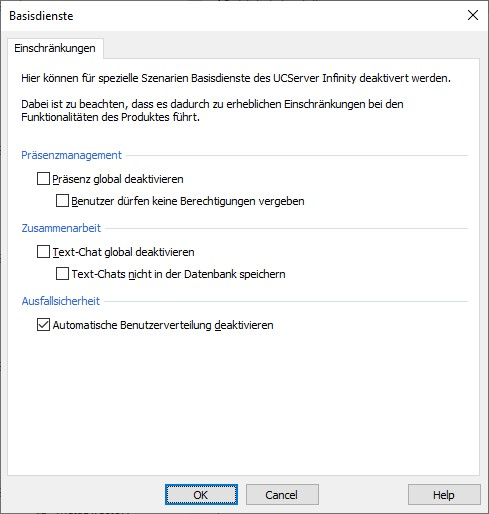
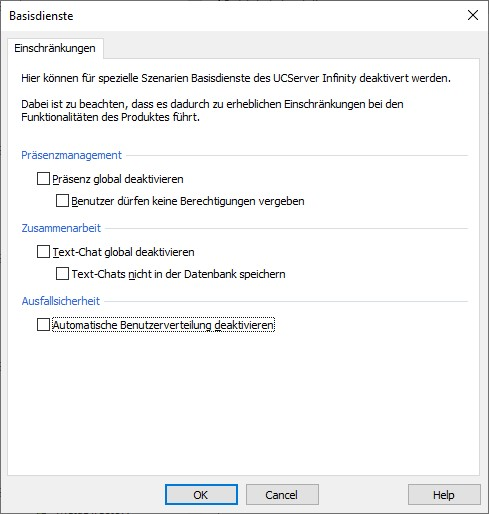
The server logic for the automatic distribution of users in the event of a UCServer failure is disabled by default.
To enable the server logic, you must explicitly uncheck the box next to "Disable automatic user distribution" in the UCServer Management under Basic Services > Failover.
Example screenshot: ProCall Infinity UCServer Administration – Basic Services – Restrictions – Fault Tolerance – Disable automatic user distribution
SIP failover: registration delay and waiting message
When SIP lines are taken over by another UCServer, the telephone system may continue to treat the previous SIP registration as active for a while. Telephone systems behave differently in this regard: some require a waiting period, whilst others do not. If the new UCServer registers too early, end devices may be disconnected or telephone services may be temporarily disrupted.
The failover delay allows the UCServer to postpone the activation of the line until the previous server’s SIP registration with the telephone system has expired. This function is disabled by default (0 s) and is only enabled when required.
You can set the registration delay in the UCServer Administration under Line Group Properties → Registrar tab → Set the failover delay:
Example screenshot: UCServer Administration – Properties for line group – Registrar – Failover delay
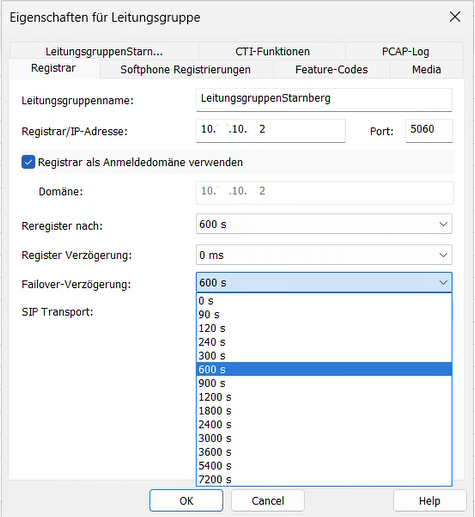
- 0 s (Default): Function off. The connection is taken over immediately once it has been released by the previous server.
- 90 s to 7200 s: Waiting time before re-registration in the event of a failover

When does the setting take effect?
Die Failover-Verzögerung gilt nur im Failover-Szenario, wenn ein UCServer nicht mehr verfügbar ist und Leitungen übernommen werden — sowohl bei automatischen als auch bei manuell angestoßenen Umzügen.
Im Normalbetrieb (geordnete Übernahme zwischen funktionierenden Servern) wird die Failover-Verzögerung nicht angewendet.
Display – Awaiting approval
Whilst a takeover is pending, the UCServer administration displays the following in the tooltip, for example: Line: out of service, takeover pending: awaiting line authorisation from [server name]

This message may also appear briefly during an orderly handover, whilst one server is waiting for another server to release the connection.
The failover delay is a special setting.
Normally, leave the value set to 0 s. Only enable the delay if your telephone system requires a waiting period. There is no standard value that applies across the board — ensure the behaviour is compatible with your telephone system and UCServer.
- Too high: Recovery after a failover takes longer; as a result, telephone services are unavailable for a longer period.
- Too low: Under certain circumstances, synchronisation between UCServer and the telephone system may not work properly; end devices may be disconnected.
Unforeseen events/Planned measures
Automatic redistribution should generally be enabled in the event of unforeseen events, such as a UCServer failure.
Connections are not automatically migrated when a user’s management server (home server) is changed via UCServer Management.
The only instance where this happens automatically is when a server failure triggers an automatic migration.
Automatic response in the event of a fault: failure of a UCServer
Relocation / User allocation
- The login logic uses current health scores to select a new management server (home server) for the affected users.
- Relocation fields (RelocationHomeserverOrigin, RelocationDate) are set in the user profile to indicate the migration.
- SIP registrations and TAPI/ECSTA connections are transferred to the new node.
- The client receives a redirect to the backup server.
Bekannte Einschränkung
After a user has been relocated, the client’s login status may be displayed incorrectly in the user list in UCServer Administration. The client is shown as logged in only on the server where the user is currently located, but as logged out on all other servers – even though the client is correctly connected. Reloading ucadmin or restarting the servers does not reliably resolve this display issue.
Return / Recovery
After the system is brought back online, a scheduled recovery job checks the relocation entries and moves users back to their original servers, provided that their original server is healthy and there is no active session.
The relocation back to the original servers is carried out in stages to avoid peak loads.
Further information
ProCall Infinity (DataCenter) Release Notes →