ProCall 8 - Release Notes 8.10
| Release date | |
|---|---|
| Type | Security Hotfix 8.10.2 for Feature Update 8.10 |
| Version | 8.10.2.12087 |
| Security advice | This update resolves a critical security vulnerability relating to the open-source node.js in the UCWeb service |

Notes on Updates
When carrying out the update, please follow the Explanations for the update within a product version.
Version info
Updated information of 26 June 2026: HOTFIX! Version 8.10.2.12087 fixes a critical security vulnerability relating to the Open Source node.js in the UCWeb service and is now available in the download section.
Updated information of 12 August 2026: ProCall Mobile for iOS (version 2026.07.21) is now available on the App Store. The compatibility issues in the previous version have been resolved.
Updated information of 16 June 2026: ProCall Mobile for iOS has been rolled back to the previous version of the app. We will let you know as soon as a new version is available for download.
Updated information of 11 June 2026: Version 8.10.1.12019 resolves an issue with the execution of custom actions in ProCall Desktop for Windows and is now available in the download section.
For UCServer, only the version number has been updated; there are no other changes. To resolve the issue, only an update of ProCall Desktop for Windows is required.
Due to compatibility issues with older versions of UCServer, ProCall Mobile for iOS will be rolled back to the previous version of the app.
A new version (2026.06.10) will be available on the App Store shortly. We are currently working on a solution and will let you know as soon as a new version is available for download.

Microsoft’s discontinuation of the EWS (Exchange Web Services) API
Microsoft has announced to gradually phase out the Exchange Web Services (EWS) API in Exchange Online from October 2026 and is expected to be completely deactivated April 2027
To ensure that ProCall can continue to retrieve information (e.g. appointments, contacts, mailbox items) from Microsoft cloud services via this API from October 2026 onwards, the ‘access to Exchange Web Services’ which will have been blocked by then must be re-enabled (EWSEnabled=true) in time before October.
Further information on the discontinuation and the procedure to follow can be found here: Retirement of EWS API by Microsoft - what does that mean for connecting estos applications to Microsoft online services?
Welcome to ProCall 8.10 – Feature Update 2605
Since the last feature update, ProCall has enhanced its group functions, for example by introducing automated actions for joining and leaving agent groups, as well as providing additional information in the favourites section regarding a user’s membership and login status within the relevant group.
The estos UCServer now allows you to monitor login attempts via the local interface (ProCall Windows) and via the web interface (mobile app and ProCall Web). After a configurable number of failed login attempts, users are blocked in the UCServer either temporarily or permanently.
Furthermore, the Remote Desktop Mode in ProCall Desktop for Windows has been enhanced and now supports automatic switching to remote control mode, which is particularly useful for hybrid workplaces and home office scenarios.
In addition, several technical improvements and minor optimisations have been implemented, including more robust communication with the licence server and new security options for failed login attempts. In addition, a security-critical bug related to the OpenSSL version used in UCWeb has been fixed (from version 8.9.3 onwards).
A new feature is support for “Forward after consultation” in ProCall Mobile for Android and iOS, which allows calls to be managed much more flexibly whilst on the move. In addition, the features of the ProCall Mobile app for iOS & Android have been expanded and existing workflows further optimised. Furthermore, Android devices now support call notifications on Wear OS smartwatches, so that incoming calls can be displayed directly on compatible smartwatches.
For ProCall Web (Preview), the Calls tab has been completely redesigned and enhanced with a new responsive layout as well as a numeric keypad to improve usability and efficiency when handling calls.
New features (since the last feature update)
ProCall 8.10
Groups
- Subscribing to and unsubscribing from agent groups can be automated via an action registered in ProCall Desktop for Windows.
(from version 8.9.4 onwards; prerequisite: update for UCServer and ProCall Desktop for Windows)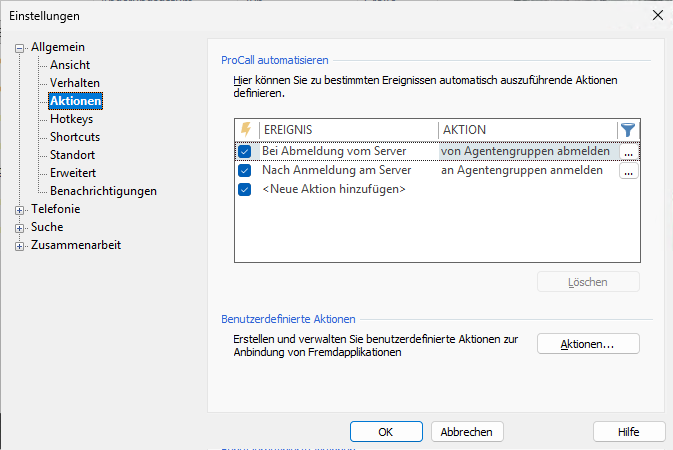
- When using a UCServer pool with agent functionality, the tooltip for a contact in the Favourites section of ProCall Desktop for Windows
(from version 8.9.3 onwards) shows which agent groups the user belongs to and whether they are logged in or not.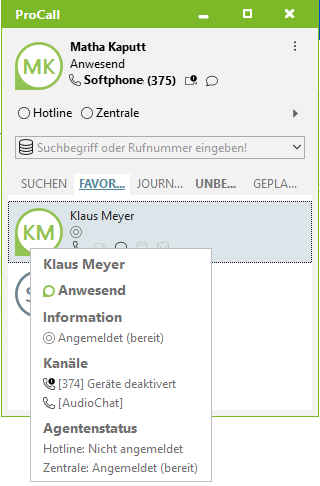
Remote Desktop Mode: Automatic switch to remote control mode
In ProCall Desktop for Windows, from version 8.9.4 onwards, the "Run Remote Control" setting for Remote Desktop Mode has been enhanced so that the client automatically switches to remote control mode as soon as a user logs in to a client that can be remotely controlled.
This means that the user can leave their workstation running in the office with the "Execute remote control" setting enabled whilst they switch to their home office, where another PC is located. If they start their PC, on which a ProCall instance with the "Allow remote control" setting is running, and open a Remote Desktop session from there to work with the usual applications on the workstation, softphone calls can also be made on the workstation whilst their headset is being used in their home office. In this case, the headset connected to the office computer is automatically deactivated.
If the client is running in a virtualised environment with the "Execute remote control" setting (e.g. on a terminal server without audio devices), the client behaves as normal.
Monitoring login attempts
The estos UCServer can monitor login attempts via the local interface (ProCall Windows) and via the web interface (mobile app and ProCall Web). Once the configured number of failed login attempts has been reached, users are deactivated or locked out in the UCServer. This prevents, for example, accounts in Microsoft Active Directory from being locked due to failed logins.
ProCall Mobile
Forward calls after consultation in ProCall Mobile for Android & iOS
The functions Call waiting, call switching and call merging are available in the in-app call window of ProCall Mobile for iOS (from version 2026.05.11) and in ProCall Mobile for Android (from version 2025.04.25). During a call, a call can be put on hold for another participant.
It is then possible to switch between the calls or to connect the two callers.
Once the call has been transferred or put on hold pending a response, the call is ended for the user.
* Depending on the telephone system
This feature is only available if the telephone system supports it.Call notifications on Wear OS smartwatches
Call notifications are now also displayed on paired smartwatches running Wear OS by Google. When a call comes in on the connected device, a notification appears simultaneously on the Wear OS smartwatch. This allows you to quickly see incoming calls without having to pick up your smartphone. Calls can be answered or rejected directly via the smartwatch. This feature requires ProCall Mobile (version 2026.04.30 or later) to be installed and set up on the connected Android smartphone. This enhancement improves accessibility in everyday working life and ensures that important calls can be answered even when on the move or with limited access to the smartphone.
ProCall Web (Preview)
New layout in the Calls tab
The Calls tab has been redesigned to improve usability, clarity and efficiency in day-to-day call handling, with a focus on accessibility. The numeric keypad makes dialling telephone numbers more intuitive and allows input via keyboard, mouse or touch, as well as the processing of telephone numbers and feature codes. The new responsive layout ensures consistent, user-friendly operation and optimal display of content at any window size. It lays the foundation for accessibility and improved scalability of ProCall Web.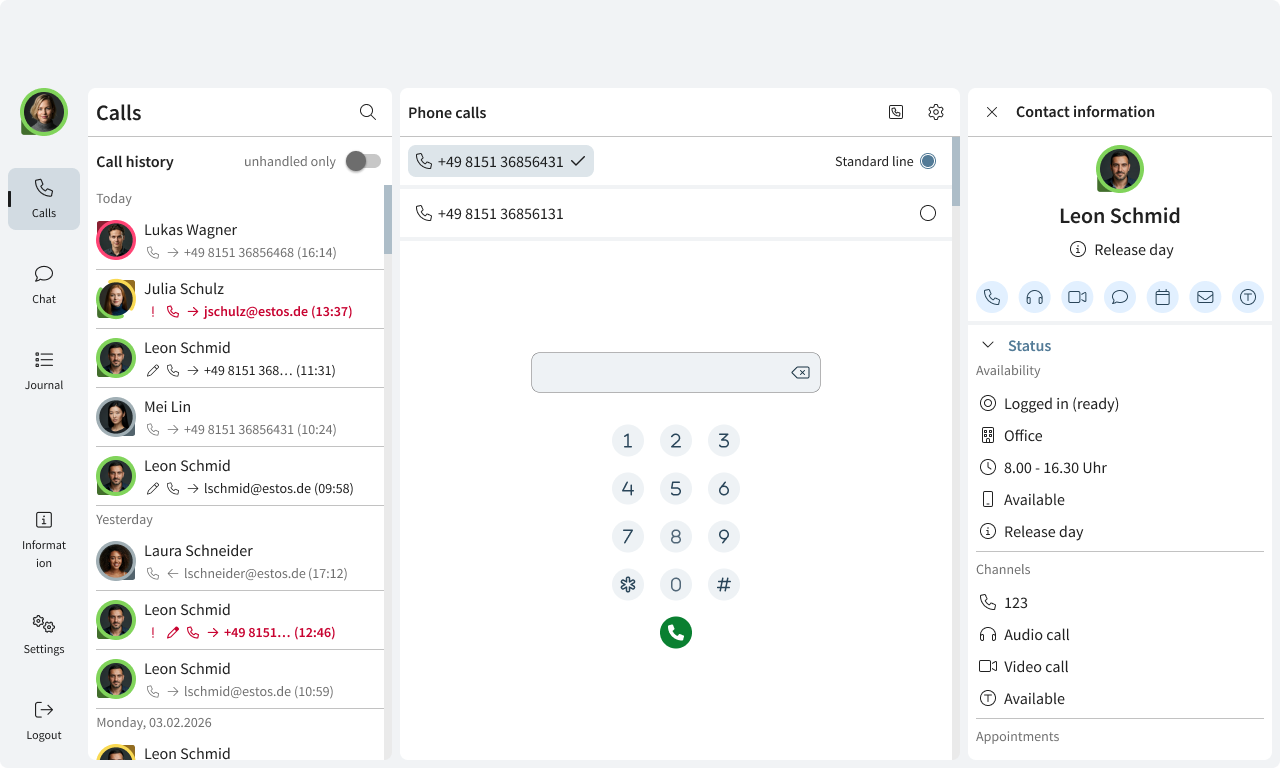
Further updates
- The reliability of communication with the licence server has been improved from version 8.9.3 onwards.
- In ProCall Desktop for Windows, the log now shows whether a call was forwarded, even when sorted by contact.
- The "Connect call partner" button can now be displayed directly in the call window. See Expand the call window to include additional buttons
Improvements and bug fixes
A security-critical vulnerability related to the underlying OpenSSL version in UCWeb has been fixed from version 8.9.3 onwards.
UCServer
- Issues with saving the UCServer administrator password have been resolved.
It is no longer possible to leave the password blank; it must be set via the "UCServer Server Setup". - A crash that occurred when stopping the UCServer service has been fixed.
- The tab for general settings in the TAPI line group is available again.
- Umlauts are now displayed correctly in error emails.
- Various memory leaks in the UCServer have been fixed.
- Various issues with the UCServer log file settings have been resolved:
- Once the log level has been changed, these will be saved to the specified directory again and will no longer be stored in the UCServer’s main directory.
- Specific settings, such as log file size, will be taken into account again.
ProCall Desktop for Windows
- If the connection to the UCServer is lost, a message is displayed in the ChatApp used in ProCall Desktop for Windows. The ChatApp is not reloaded until the connection has been re-established.
- The contents of the clipboard can be pasted into the search field by right-clicking and selecting 'Paste'.
- When ProCall Desktop for Windows is used in Remote Desktop mode, contacts that have been resolved in Microsoft Outlook are now also displayed in the journal.
- The display issue in the journal browser when many entries were displayed has been resolved.
- The issues with the Bluetooth connection have been resolved. The connection and access to contacts and the call log are working again.
The feature "Making calls via your mobile phone using a headset connected to your PC" does not currently work with all hardware. Investigations into this matter are still ongoing.
- If two users share the same computer but have separate ProCall accounts, their profiles and call forwarding settings will no longer be carried over.
After updating the UCServer and ProCall Desktop for Windows, you must delete any profiles carried over from other users.
ProCall Mobile
ProCall Web (Preview)
Known problems and restrictions
ProCall Enterprise known problems and restrictions →
Further information
ProCall Enterprise: Supported third-party products
ProCall 8 Enterprise system requirements