estos ProCall Analytics log files
| State of knowledge | December 2025 |
|---|---|
| Product relevance | estos ProCall Analytics 3 |
Log files for the operation of estos ProCall Analytics
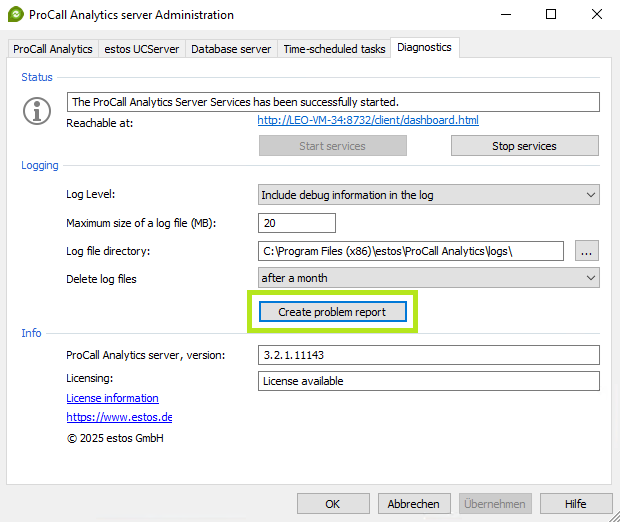
The button Create problem report w provides the log files generated by the estos ProCall Analytics Server services in a ZIP archive at a location of your choice.
Example screenshot ProCall Analytics Server Administration – Diagnostics – Logging – Create problem report
You can use the following list of log files in this data archive to check whether all relevant data is present.

ProCall Analytics list of log files
| Name of log file(s) | purpose | Comments |
|---|---|---|
EAnalyticsDataService.x.log | Protokollierung der Datenauswertungsoperationen | x follows the formatting scheme of consecutive numbering starting with 0, whereby the most recent log file does not contain this index number in the file name and the oldest log file has the highest index number in the file name. |
EAnalyticsDiagnostic.log | Logging of cyclical environmental testing | |
EAnalyticsReportingService.x.log | Logging of operations for evaluations and reports | x follows the formatting scheme of consecutive numbering starting with 0, whereby the most recent log file does not contain this index number in the file name and the oldest log file has the highest index number in the file name. |
EAnalyticsWebServer.x.log | Logging of access to the ProCall Analytics web interface and requests in the ProCall Analytics dashboard | x follows the formatting scheme of consecutive numbering starting with 0, whereby the most recent log file does not contain this index number in the file name and the oldest log file has the highest index number in the file name. |
| ||
Environment.txt |
| |
ProblemReport.txt | contains the problem description entered by the reporter:
| |
 The two files listed below are only created when the logs are made available in the ZIP archive, so they are not included in the log directory when the system is running.
Location of log files
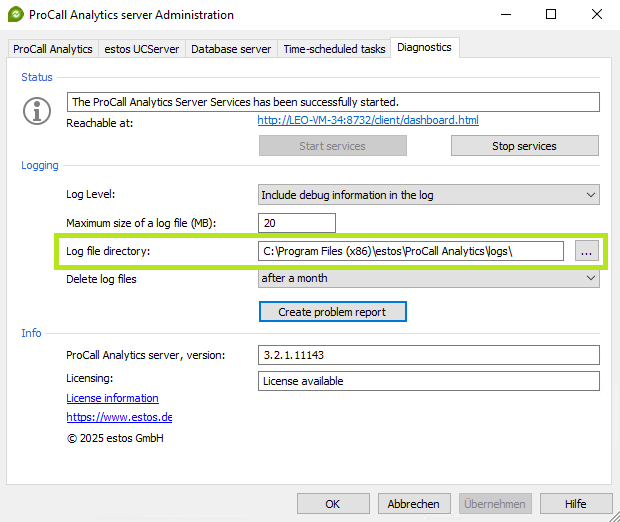
Unless the directory for events has been explicitly changed in the estos ProCall Analytics Server administration, the storage location of the log files on the ProCall Analytics Server is set to the following in the standard installation <ProCallAnalyticsInstDirectory>\logs (e.g. C:\Program Files (x86)\estos\ProCall Analytics\logs):
Example screenshot ProCall Analytics Server Administration – Diagnostics – Logging – Log file directory