RTT (Real-Time Text) – real-time text communication
State of knowledge
April 2025 ProCall Web (Preview)
Prerequisite: ProCall 8, version 8.7 or later
Enter text during a conversation that is sent to the other person immediately
The Real-Time Text (RTT) function enables real-time text communication during asoftphoneor TAPI call as well as during a video and audio chats between two call participants.
How to activate/deactivate the RTT function in ProCall Web?
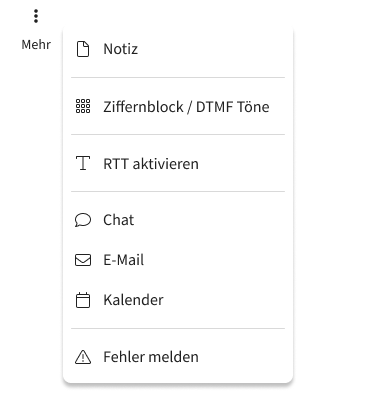
The RTT function can be enabled or disabled in the "More" menu.
Example screenshot of ProCall Web – Enabling the RTT function via the three dots under "More" – Enable RTT
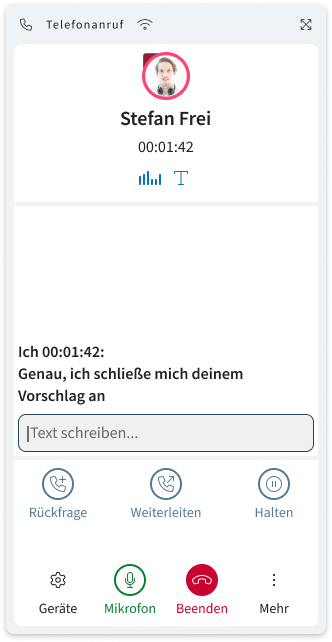
When the RTT function is enabled, you can enter text into the RTT text field during a call. The text is transmitted immediately, character by character, enabling accessible communication is created. Speakers and typists are treated equally, so that speech and text are seamlessly combined. The feature facilitates communication for all users who cannot or do not wish to speak, such as deaf or hard-of-hearing people.
The prerequisite is that both participants in the call are using ProCall Web.
Example screenshot of ProCall Web with the RTT function enabled – text can be entered during the call and is transmitted immediately, character by character