Audio/video chat between ProCall Desktops for Windows (LAN and VPN-free)
| State of knowledge | February 2026 |
|---|---|
| Relevant for product(s) | estos ProCall 8 Enterprise estos ProCall Desktop for Windows |
Szenario
- In these ProCall Desktop for Windows connections without a VPN, an audio or video chat is initiated; the other party is a ProCall Enterprise user with ProCall Desktop for Windows or
- When connected locally via ProCall Desktop for Windows, an audio or video chat is initiated; the other party is a ProCall Enterprise user connected via ProCall Desktop for Windows (VPN-less).
- Both participants in the audio or video chat communicate via this connection.
- In VPN-less mode, the user connects via estos UCConnect (Connect ProCall for Windows easily via the internet ("VPN-free")).
Notes
With regard to the media flow paths between two instances of estos ProCall Enterprise clients (ProCall Desktop for Windows, ProCall Mobile for iOS / Android), audio and video chats differ significantly from SIP softphone calls. In an audio/video chat , the exchange of SRTP packets takes place between the clients. The media streams are therefore not routed via the estos UC Media Server, as is the case with a SIP softphone call. Either the clients exchange the audio or video data directly, or, if the network paths do not allow for direct data exchange, via the estos UCConnect TURN Server.
Diagram/Topology: UCServer Service – ProCall Desktop for Windows – UCConnect Services – ProCall Desktop for Windows (VPN-less) – SRTP Audio/Video via TURN:
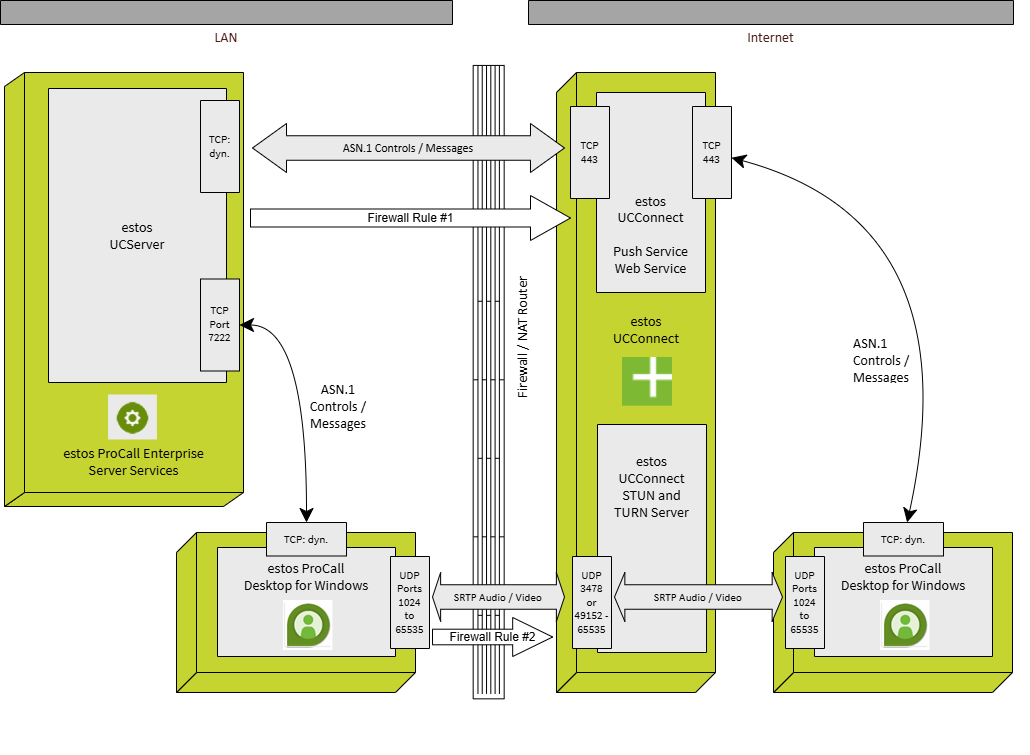
The estos UC Media Server does not handle any relay or transcoding tasks for audio and video chats. Furthermore, the telephone system connected to the estos ProCall Enterprise Server is not involved in these scenarios and therefore has no information about active chats. The UCServer SIP Gateway is not active during SIP signalling or media stream negotiation. This lack of communication with the telephone system may be relevant for the control of call protection or the status Busy on Busy
The topology diagram shows a typical ProCall Enterprise installation including an estos UCConnect connection, assuming unrestricted communication between estos ProCall Desktop for Windows, operated without a VPN, and estos UCConnect . It is also assumed that there is unrestricted communication between ProCall Desktop for Windows on the LAN and the ProCall Enterprise Server.
ProCall Desktops for Windows on the LAN establishes a connection to ProCall Enterprise Server on port 7222 (the default setting) via a dynamically assigned TCP port. The client uses this connection to exchange requests and events with the server.
Both ProCall Desktop for Windows in VPN-less mode and estos UCServer establish a connection to estos UCConnect port 443 via a dynamically assigned TCP port and set up WebSocket communication over this connection. Via this connection, the client on the internet and the UCServer exchange requests and events via UCConnect in order to process telephony events or carry out telephony activities.
To exchange RTP media packets during an audio or video chat, the clients use ICE handshake a connection via UDP with one another (WebRTC standard). Ports in the range 1024 to 65535 are used (all ports except the well-known ports). Where necessary, the clients also take available STUN and TURN servers into account to optimise the media path.
The ICE protocol (Interactive Connectivity Establishment, as defined in RFC 8445), which is integrated into WebRTC, attempts to determine the optimal path between clients when establishing a connection. Even during an existing connection, ICE verifies the best route in the background. If, due to a change in the internet situation, a route proves to be better than the one currently in use, this may result in one or more route changes between these two endpoints during the course of an audio/video chat.
If the ICE protocol determines that a direct exchange of audio packets between the LAN and the internet is not possible via the firewall or NAT router, this can – as illustrated in the topology diagram – also result in a media connection between the clients via a TURN server. The question of whether this is specifically a relay-srflx/prflx connection (as shown here) or a relay-relay connection is not considered further here.

Firewall rules
The firewall rules listed here represent the minimum requirements that can be assumed without specific knowledge of the relevant environment.
| Rule # | Task | Direction | Source IP:Port | Destination IP:Port | Protocol | Notes |
|---|---|---|---|---|---|---|
| 1 | Connecting the ProCall Enterprise Server to estos UCConnect for the exchange of ASN.1 messages (internal communication protocol) | OUT | <UCServer-Host>:any | *.ucconnect.de:443 | TCP | The WebSocket protocol must be supported. |
| 2 | Media stream between ProCall Desktop for Windows and estos UCConnect TURN Server Determining the srflx and relay addresses via the estos UCConnect STUN/TURN server | OUT | <ProCallClient>:any | *.ucconnect.de:3478 | UDP |