State of knowledge

April 2026

ProCall Infinity (DataCenter) from version 2603.0 
with self-hosted ProCall App für Web 

Starting with version 2603.0 of ProCall Infinity (formerly ProCall DataCenter), users who log in to the ProCall App for Web on an administration server of the network are automatically redirected to the administration server responsible for that user.
With the configuration of the administration server forwarding described here, it is also possible to set up the app so that users do not need to specify an administration server of the network when logging in.

What are the benefits of management server forwarding?

If the forwarding of the management server is set up in ProCall Infinity, users of the ProCall app for web no longer have to manually enter a management server when logging in, but can log in directly and easily:

  • It is no longer necessary to enter the UCConnectID or a UCServer URI to log in.
  • Users can log in by only entering their user name and password.

Prerequisite 

Procedure/set-up

config.json

Open the config.json file of ProCall Web, which is located in the target directory of the WebServer. 

Add ucserverlist

Add the "ucServerList" to the file and add a child element with the key "webEndpoint" and the corresponding URI of the UCServer for each UCServer in the system. 

Result - Simplified login for users 

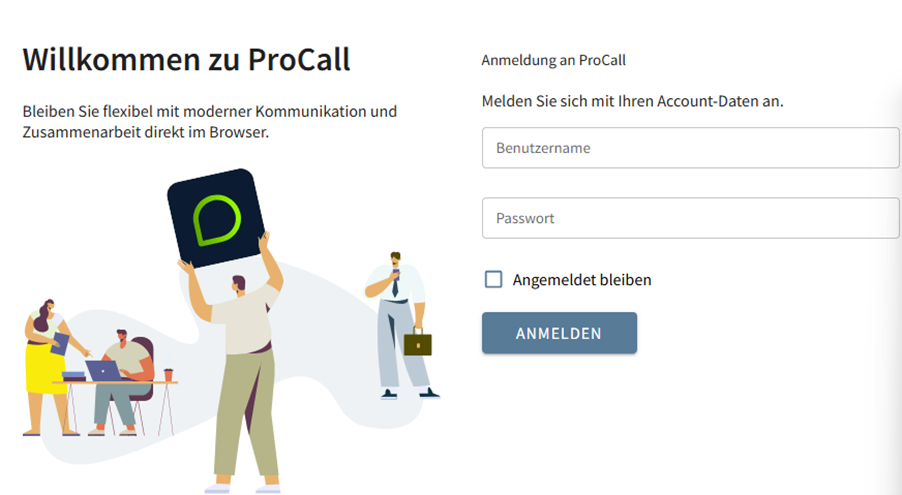
Once the configuration of the "ucServerList" has been successfully completed, the simplified registration/login is available to users: 

Example screenshot: Login in the ProCall App for Web - only the account data is required for login, no UCConnectID or UCServer URI