Global line management in ProCall Infinity
June 2026
ProCall Infinity (DataCenter) from Version 2603.1 onwards
ECSTA 7 since version 7.1.5
ECSTA for MX-One
In a multi-server environment using ProCall Infinity (DataCenter) and deployed ECSTA systems, the UCServers all in the network available TAPI lines to and not just those on the respective server provided by ECSTA TAPI lines.
Prerequisite
The synchronisation is carried out via the line group name, therefore it is necessary that the ECSTA instances line group names on all UCServers are identical.

Restrictions in global line management
- Setting the management server (home server) when activating a line
If a line is activated on a UCServer whose ECSTA does not support this, the message “Attempting activation...” will remain permanently in the “Management server” column.
To set the correct management server (home server), the correct server can be selected manually in the “Management server” field under the general line settings.

- Location of a line group
- Location of a line
- Line number (under Line properties)
- Settings for a location (which is assigned to at least one line group or line)
Create and activate lines as required
Create lines as needed
If the lines have not yet been created on the other servers, the setting "Create lines automatically as required " must be enabled for the TAPI line group via UCServer Management.
In the ECSTA settings, the following setting must be configured:
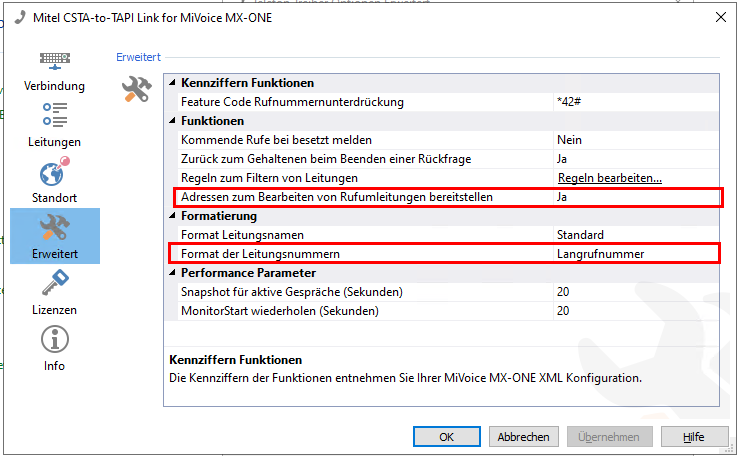
Under Functions "Provide addresses for call forwarding", enable this option and ensure that under Formatting the format of the line numbers is set to long number .
Example screenshot of Mitel MX-One settings – Advanced – Configuring functions and formatting

Once the “Automatically create lines as required” option has been enabled and applied in UCServer, the “Remove” button for deleting lines in ECSTA is disabled to prevent conflicts whilst UCServer is automatically creating lines. The button will only become active again once the function has been disabled in UCServer or UCServer has been shut down.