Install Redis on Ubuntu
May 2026
A Redis database is required for ProCall Infinity (DataCenter).
In the following instructions, we provide information on the procedure as an example to install Redis on Ubuntu 2204.

These instructions are intended as a guide and assume specialist knowledge.
Since Redis is not a product or service provided by estos, there is no claim to completeness and correct description.
Procedure

Installation
Ubuntu2204
sudo apt updateInstall Redis
sudo apt install redis-serverCheck Redis version
redis-server --version
Configuration
Edit config
sudo nano /etc/redis/redis.confThe following items must be set:
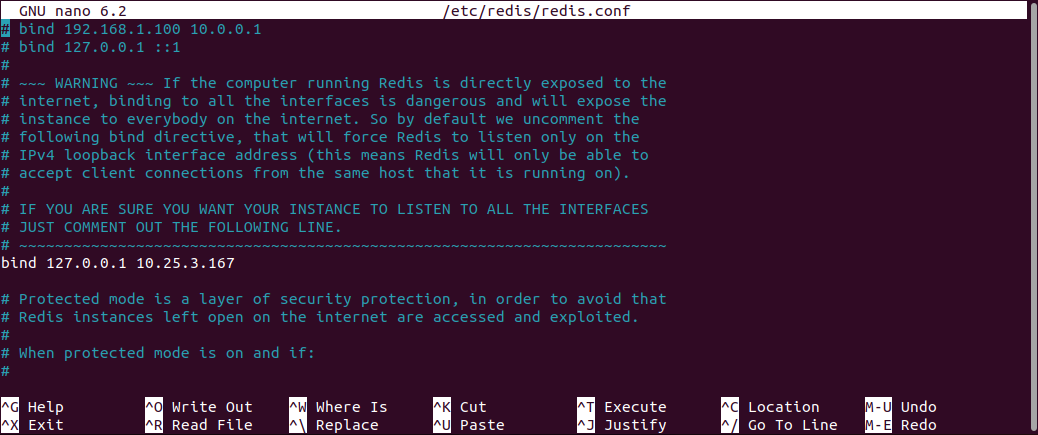
Binding the network address
This is used to configure which IP address the Redis service should "listen" to. The configured network address must then be entered in UCServer Administration.
bind <ip-addr> Example screenshot redis.conf
Port
This can be used to configure the port via which the service can be reached. By default, this is "6379". The configured port must then be entered in the UCServer administration;
port <port>Protection mode
The "protected mode" is activated by default. This means that the Redis service cannot be reached by another host until a password (see "requirepass") has been set. If the Redis service is to be accessed by another host without a password, the value must be set to "no";
protected-mode <value> (yes/no)Password protection
Access to the Redis service can be protected by a password. The configured password must then be entered in UCServer Administration;
requirepass <password>Start service
Restart Redis
sudo systemctl restart redis.serviceCheck whether Redis service is running
sudo systemctl status redisExample screenshot for the display
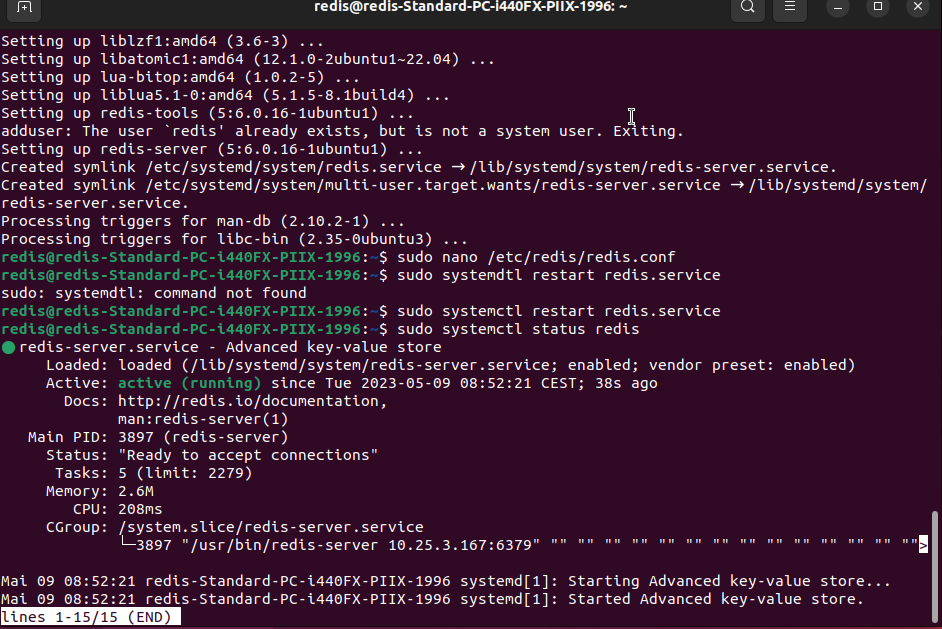
Redis is now ready for use and can be connected in the ProCall DataCenter UCServer.
Redundancy through Redis network
Redis Sentinel is supported in order to design the Redis backend redundantly and thus achieve a higher degree of reliability. The use of Redis Sentinel is based on the configuration of Redis Replicas.
Recommendation
The Sentinel instances, as well as the Redis Server instances, should be placed on computers or virtual machines that are assumed to fail independently of each other. For example, different physical servers or virtual machines running in different availability zones. For a stable deployment, you need at least three Sentinel instances, just like the Redis Server instances.
For the connection setup, Redis Sentinel can be used with ProCall Infinity.

When applying the changed Redis settings, the UCServer (to which UCAdmin is connected) first attempts a test connection only, which does not interrupt or affect the current connection to Redis. If the test connection fails, this is reported to UCAdmin with a meaningful error message. Only when the test connection has been successfully established will the changed settings become active for the main connection.
Nevertheless, it is highly recommended to first test the connection to the installed Redis Sentinel system on a UCServer that is not running in the production environment.
Background information on Redis Sentinel
Fail-safe operation, master/slave concept and watchdog function for Redis
Redis Sentinel is a distributed system that ensures the high availability of Redis by monitoring Redis instances, performing automatic failover when a master server fails, and informing clients about the current master. It acts as a kind of "watchdog" that constantly checks the health of the master and slave instances and, if necessary, selects a new master from the slaves and adjusts the configuration without human intervention.
Differences between Redis Sentinel and Redis Cluster
Redis Sentinel should not be confused with Redis Cluster:
Redis Sentinel is responsible for high availability (HA) through automatic failover in a master-replica setup, while Redis Cluster is designed for horizontal scaling by sharding large data sets across multiple nodes. Sentinel monitors and redirects clients when a master fails, while Cluster distributes the data itself to increase throughput and storage capacity.
ProCall Infinity (Datacenter) is prepared for establishing connections and using Redis Sentinel.
Redis Cluster, on the other hand, is not supported.
Redis Replica
Anleitung
You can find the complete Redis replication guide here: https://redis.io/docs/management/replication/
The Redis master is configured via redis.conf as described above. The replicas are also configured via redis.conf. Replication takes place via the Redis service and does not need to be started separately. When configuring the replicas, make sure that the port and password used correspond to those of the master configuration;
The following configuration settings must also be made on the replica side:
Specification of the master
The replica must be informed of the IP and port of the master instance via which it can reach the master;
replicaof <ip> <port>Password of the master
If the master is protected with a password, the password of the master must be entered here. The Redis Replica should have the same password set in the "requirepass" parameter as the master password in order to support a master change;
masterauth <password>Using Docker
Recommendation
If you use Redis Replication in conjunction with Docker, please note that additional configuration parameters may need to be specified. Please consult the official Redis Sentinel documentation;
Redis Sentinel
Anleitung
The complete Redis Sentinel manual can be found here: https://redis.io/docs/management/sentinel/
Configuration
Port
This can be used to configure the port via which the service can be reached. By default, this is "26379". The configured port must then be entered in the UCServer administration;
port <sentinel-port>Definition of the master to be monitored
This is used to configure which Redis master the Sentinel service should monitor. The <master-name> can be freely assigned. The configured name must then be entered in UCServer Administration. Furthermore, the IP and port of the Redis master must be entered under which it can be reached. A "quorum" must also be defined for error detection. This is the number of Redis Sentinel instances that must agree that the Redis master instance can no longer be reached. A majority of the Sentinel instances is always required for the actual troubleshooting, i.e. the election of a replica as the new master. This cannot be configured;
sentinel monitor <master-name> <ip> <redis-port> <quorum>Password of the Redis Master and the Redis Replicas
In order for Redis Sentinel to communicate with the Redis master, the Sentinel service must know the master's password;
sentinel auth-pass <master-name> <password>The master and its replicas must use the same password.
Sentinel Passwort

Sentinel Password
Currently, setting a password for Redis Sentinel is not supported.
The Sentinel service can be protected by a password. All Sentinel services that need to communicate with each other must use the same password;
requirepass <password>Definition of the downtime for failure detection
This can be used to define how long a master may take for a response before it is recognized as failed. The default value is 30000 ms. The name specified under "sentinel monitor" should be used as the master name.
sentinel down-after-milliseconds <master-name> <milliseconds>Definition of parallel re-synchronizations
The parameter defines how many replicas may synchronize against the newly selected master in parallel. This parameter should be set to a low value, especially if the replicas are used by the Redis clients for read purposes. As the data is only read from the master in this context, this value can be set high. It can include the complete number of existing replicas. The name specified under "sentinel monitor" should be used as the master name.
sentinel parallel-syncs <master-name> <numreplicas>Definition of downtime
The specified time is used for many purposes (see sentinel.conf for more information). The default value is 180000ms, i.e. 3 minutes. The name specified under "sentinel monitor" is to be used as the master name.
sentinel failover-timeout <master-name> <milliseconds>Use of Docker
Recommendation
If you use Redis Sentinel in conjunction with Docker, please note that additional configuration parameters may need to be specified. Please consult the official Redis Sentinel documentation;
Start service
The service is started by the following call:
redis-sentinel /path/to/sentinel.confConfiguring Procall Infinity with Redis Sentinel
The Redis settings can only be changed while the UCServer is running.
In UCServer Administration, the settings are adjusted on the "Redis" page. Once applied, they are adopted by all UCServers in the Infinity (DataCentre) network.
The safest way to change the Redis configuration is during a maintenance window.
First, all UCServers that manage users and/or lines are shut down until only one UCServer is still running, on which the change is then carried out. Afterwards, all UCServers are restarted.
Example screenshot UCServer Administration Infinity - Global Settings - General - Redis - Sentinel Monitor Master Name - IP Addresses and Ports
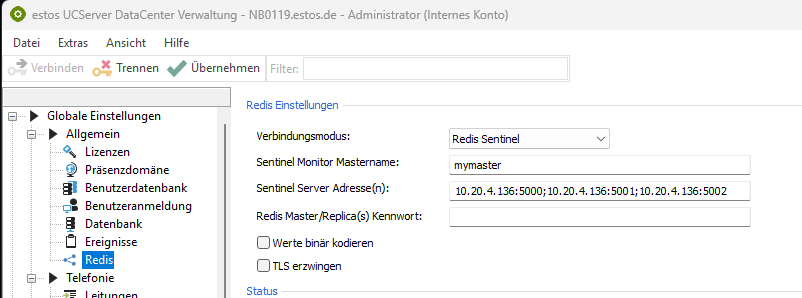
The connection mode is set to "Redis Sentinel".
The name must be entered in the field Sentinel Monitor Mastername as defined in sentinel_input.conf.
The Sentinel server addresses must be entered in the form <host>:<port> and separated by ";".
If the connection type is subsequently changed, the values last used in this mode are automatically entered.