Observation
The replicator for text/CSV files aborts and displays an error message.
Example screenshot: MetaDirectory replication – Text CSV file – failed

Possible cause
In a record or attribute, the content contains a quotation mark "
With the CSV replicator it is so that a field can be enclosed with quotation marks.
This has the consequence that no further quotation marks may be present in the data sets, otherwise the replication cannot work.
Checking possible causes
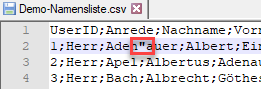
Check in the CSV file if a record contains additional quotation marks (").
Example screenshot: CSV file – check records for contained quotes
Solution/Procedure
Alternative: Remove quotation marks from CSV file
Search for the quotation marks in the CSV file and remove them from the records.
Alternative: Replace quotation marks in the CSV file
Search for the quotation marks in the CSV file and replace them in all records with another character or character combination suitable for your application.
For example, use a single quotation mark (ASCII 0d39) instead of a double quotation mark (ASCII 0d34).
Alternative: Use ODBC replicator
Do not use the CSV replicator, but set up an ODBC replicator, this can replicate the quotes as well.
Further articles
Problems with character encoding in ODBC text replication